|
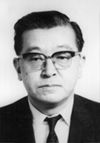
The Cause and Effect diagram also known as the "fishbone"
or "Ishikawa" diagram after its creator Kaoru Ishikawa is used
to systematically list all the different causes that can be attributed
to a specific problem (or effect). A cause-and-effect diagram can help
identify the reasons why a process goes out of control.
How
to - Cause and Effect
The guide includes an overview of cause and effect diagrams, when to use
them, how to use them; as well as exercises for
getting started...
The
US Navy Total Quality Leadership Office
|
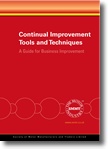
A Guide for Business Improvement
|
|

View larger image |
This guide explains how to carry out
more than twenty tools & techniques necessary to ensure your
business continually improves.
Topics covered include:
Affinity diagrams, Bar charts, Black & white charts, Brainstorming,
Cause & effect diagrams, Design of Experiments
(DoE), Failure Mode, Effect and Criticality Analysis (FMEA/FMECA),
Fault Tree Analysis (FTA), Five WHY’s for root cause analysis,
Five Ws & one H for problem definition, Flow charting, Histograms,
Pareto analysis, Pictograms, Pie charts, Plan-Do-Check-Act (PDCA)
cycle, Quality Function Deployment (QFD), Rating, Repeatability
and Reproducibility tests (R&R), Run charts, Significance testing,
Solution effect diagrams
Also includes a handy matrix showing when to apply which tool &
technique. |
| |
| Further reading |

|
The Memory
Jogger II: A Pocket Guide of Tools for Continuous Improvement
Michael Brassard |
| This
handy Pocket Guide uses graphics and easy-to-understand text to
describe what the tools are, why they’re used, and how to
use them. Tools are explained using real-life examples from all
types of organisations, making them easy for everyone to understand
and apply. The 22 Tools covered are
Activity Network Diagram, Affinity Diagram, Brainstorming, Cause
& Effect (Fishbone), Check Sheets, Control Charts, Data Points,
Flowchart, Force Field Analysis, Histograms, Interrelationship Digraph
(ID), Matrix Diagram, Multivoting, Pareto Chart, Prioritization
Matrices, Problem Solving Model, Process Capability, Radar Chart,
Run Chart, Scatter Diagram, Team Guidelines, Tree Diagram, Process
Decision, Program Chart, Nominal Group Technique (NGT).
|
| Buy
UK |
Buy
US |
|

top of page |
|